


ESCL-0601 A-D


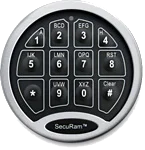
SecuRam™ SafeLogic Basic EC-0601 A
Safes with this Lock:
MRX Pharmacy

IMPORTANT
To ensure the safety of you belongings, you Must change the factory set Master Code to Your own unique code immediately!
Two Code Capacity
User Code: Can open lock. User Default Code is factory set
Manager Code: Can open lock, set lock functions, & manage User.
Manufacturer Default Code is factory set
Please see your user manual for the factory set Codes or contact Tech Support.
Always perform this operation with the door open
Before closing the door, make sure all the changes are correct.
Open Lock
Enter : Manager or User code
Please see your user manual for the factory set Codes or contact Tech Support.
Lock will open
Change Manager Code
Enter : 0-0-0-0-0-0
Two Beeps sound, which indicates the entry is valid & the system is waiting for code changing
Enter : [Existing] Manager Code [Factory set Default Manager Code: x – x – x – x – x – x]
Two Beeps sound, which indicates the entry is valid
Please see your user manual for the factory set Codes or contact Tech Support.
Enter : New Code [6-digits]
One Beep sounds, which indicates the entry is accepted
Re-Enter : New Code [6-digits]
One Beep sounds, which indicates the codes entered in previous steps are the same & the code changing process is succcessful
Record the new Manager Code for safe keeping.
Note:
Verify the new manager code at least 3 times before closing the door to make sure the code is correct.
Enter : 0-0-0-0-0-0
Two Beeps sound, which indicates the entry is valid & the system is waiting for code changing
Enter : [Existing] User Code [Factory set Default User Code: x – x – x – x – x – x]
Two Beeps sound, which indicates the entry is valid
Please see your user manual for the factory set Codes or contact Tech Support.
Enter : New User Code [6-digits]
One Beep sounds, which indicates the entry is accepted
Re-Enter : New User Code [6-digits]
One Beep sounds, which indicates the codes entered in previous steps are the same & the code changing process is succcessful
Note:
Verify the new user code at least 3 times before closing the door to make sure the code is correct.
Please contact Tech Support at 888.381.8514 for assistance.
Live Technical Support Available Monday – Friday 8:00am – 4:30pm [Pacific Standard Time]
Click Here to view our Mesa Safe Warranty.
Click Here to view our Limited Lifetime MBF Gun Safe Warranty.
