


MSL-G89908-B


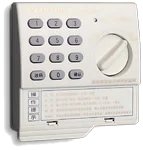
MSL-G89908-B Lock
Safes with this Lock:
MWS Wall Safes
These safes have been discontinued.

IMPORTANT
To ensure the safety of your belongings, you MUST change the factory set User Codes to your own unique codes immediately!
Key [1 pc]
Batteries[5 pcs]
Screws for fixing [2pcs]
Instruction Manual [1pc]
Factory Set Code: 159
[Default Override Code : 888]
The override code, when used, will change the user code back to the original default code of 0.
Input correct override code, then press the [OK] button.
The OPEN LOCK light will signal once, and the user code is now set back to the original default code.
[Can be 1 to 15 digits]
Input the current user code, then press the [C] button twice, then input your new code and press [OK].
[1 to 15 digits]
Input the current user code, then press the [C] button
Input your new code and press [OK]
IMPORTANT: Test lock operation several times before closing the door.
[Default User Code: 0]
Input correct user code, then prress the [OK] button.
The OPEN LOCK light will signal once, then turn the knob to the right.
VALID CODE ENTRY / CHANGE: The OPEN LOCK light will signal once.
INVALID CODE ENTRY / CHANGE: The OPEN LOCK light will signal twice.
VALID CODE ENTRY / CHANGE: The OPEN LOCK light will signal once.
INVALID CODE ENTRY / CHANGE: The OPEN LOCK light will signal twice.
If the battery low, the lock will signal three times after the correct user code has been entered.
If the incorrect code has been entered four consecutive times the alarm will sound.
If the lock is tampered with or struck, the alarm will sound.
TO DISARM THE ALARM, ENTER THE CORRECT USER CODE
Please contact Tech Support at 888.381.8514 for assistance.
Live Technical Support Available Monday – Friday 8:00am – 4:30pm [Pacific Standard Time]
Click Here to view our Mesa Safe Warranty.
Click Here to view our Limited Lifetime MBF Gun Safe Warranty.
