


MSL-MFS1


MSL-MFS1 Lock
Safes with this Lock:
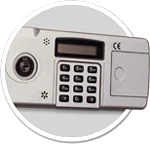

IMPORTANT
To ensure the safety of your belongings, you MUST change the factory set Default Code to your own unique code immediately!
5 Code Capacity
Users : Master, User 1, User 2, User 3 & User 4
Lock is shipped from factory with a factory set Default Code
Please see your user manual for the factory set Default Code or
contact Tech Support.
LCD Display
Large, easy to ready illuminated display
Set Date & Time
View Battery Life
Lock-Out Mode
If 3 incorrect codes are entered in a row, the Lock-out Mode will trigger for a period of 3 minutes.
Viewing Log
Allows you to view how the safe was accessed by which user, how many times & if each entry was successful or not
Manager Key [Handle Lock]
For locking the safe handle. Keypad will still work, however the safe cannot be opened
Safe includes 2 Manager Keys
Always Perform this operation with the door open
Before closing the door, make sure all the changes are correct.
Quick Start
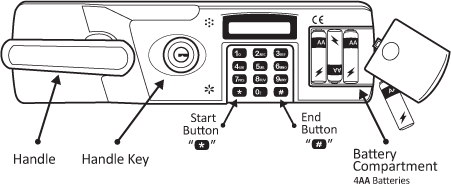
Slide the battery cover off the right hand side of the lock face
Insert 4AA batteries into the battery compartment & replace cover
You will hear a ‘Beep’ once the batteries are properly installed
Enter: *-Default Code-#
[* = Start Button; # = End Button; see graph]
Default Code: [factory set Code * – x – x – x – x – #]
If entered correctly, [[MATCH!]] will appear on the display.
You will hear a slight ‘Click’ & have approximately 3 seconds to open the door
Pull handle downward to open the door
If a wrong code is entered, lock will ‘Beep’ 2 times & [[ERROR]] will display
Note:
Make sure the handle lock is in the unlocked position
If a wrong code is entered 3 times consecutively, the lock will go into Lock-Out Mode for 3 minutes
[[WAIT]] will display & ‘Beep’ every couple seconds for the duration of this period.
Note:
During Lock-Out Mode you will not be able to insert any codes. If you attempt to remove the batteries & reinsert them, the Lock-Out Mode time will reset.
Always perform this operation with the door open! Test the new code several times before closing the door
Press the Reset button
[Located inside the door panel; black button on back of door]
[[NEW_PW]] will display along with a ‘Beep’
Input : New Code-#
You will have approximately 10 seconds to enter your new code [1-8 digits]
[[NEW_PW]] will display & ‘Beep’ 3 times
IMPORTANT
To ensure the safety of your belongings, you MUST change the factory set Default Code to your own unique code immediately!
You must know the Master Code to set additional User Codes.
Input : *-#
[[MASTER_PW]] will display
Input : Master Code-#
[[0_EXIT]] will display
Input : 1
[[C-NO:]] will display
Input : User Number you would like to change or set
2 = User 2; 3 = User 3; 4 = User 4; 5 = User 5
[[NEW_PW:]] will displayInput : New Code for that User [1-8 digits]
Input : #
[[SUCCESS!]] will display if entered correctly
Example : *-#-x-x-x-x-#-1-2-1-2-3-4-#-1-2-3-4-#
If at any step you get a [[FAILURE]] or any errors, you must begin from Step 1 again
You must know the Master Code to delete User Codes.
Input : *-#
[[MASTER_PW]] will display
Input : Master Code-#
[[0_EXIT]] will display
Input : 2
[[D-NO:]] will display
Input : User Number you would like to delete
2 = User 2; 3 = User 3; 4 = User 4; 5 = User 5
[[1=YES OR 0=NO]] will display
Input : 1
[[SUCCESS!]] will display if entered correctly
Example : *-#-x-x-x-x-#-2-2-1
If you change your mind & decide not to delete the selected User Code, press 0 instead of 1 & the precedure will cancel [as it appears on display: [[…0=NO]] ]
You must know the Master Code to delete Display Mode.
Input : *-#
[[MASTER_PW]] will display
Input : Master Code-#
[[0_EXIT]] will display
Input : 7
[[DISPLAY MODE]] will display
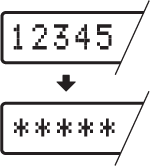
If the Display Mode is changed successfully, all digits will now appear as asterisks [*] instead of digits
To change the Display Mode back, repeat Steps 1-4
Example : *-#-x-x-x-x-#-7
You must know the Master Code to view the Log.
Input : *-#
[[MASTER_PW]] will display
Input : Master Code-#
[[0_EXIT]] will display
Input : 8
Several digits will appear on the display
Input : # to scroll from page to page
Each page is one full screen
Example : *-#-x-x-x-x-#-8-#…
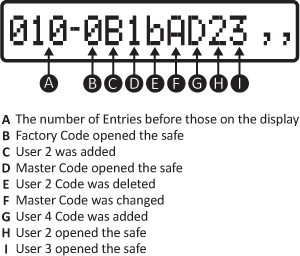
If number 1-5 appears on the display, the safe was opened successfully using the User 1 Code [the Master Code], & so forth
If A-E is shown on the display, a User Password was changed
[A = Master Code; B = User 2 Code, & so on through the letter E]
If B-E is shown on the display, User 2-5 was deleted
If 0 is shown on the display, the safe was opened with the Factory Code
If X is shown on the display, 3 wrong codes were entered & the safe went into Lock-Out Mode
You must know the Master Code to delete the Log.
Input : *-#
[[MASTER_PW]] will display
Input : Master Code-#
[[0_EXIT]] will display
Input : 9
[[1=YES OR 0=NO]] will display
Input : 1
[[SUCCESS!]] will display
Example : *-#-x-x-x-x-#-9-1
If you change your mind & decide not to delete the Log, press 0 instead of 1 & the procedure will cancel
[as it appears on display: [[…0=NO]] ]
Adding & Changing Additional User Codes : *-#-MASTER CODE-#-1
Deleting User Codes : *-#-MASTER CODE-#-2
Changing the Display Mode : *-#-MASTER CODE-#-7
Viewing the Log : *-#-MASTER CODE-#-8
Deleting the Log : *-#-MASTER CODE-#-9
A fire safe contains insulation material, which may cause humidity to be present when closed for extended periods of time. It is recommended that the safe is opened on a regular basis and interior allowed to air out. It is also recommended that safe contents sensitive to moisture be kept in a sealed container. [ i.e., zip-lock bag, etc.]
Click Here to see Mesa MD-Series Dehumidifiers for your fire safe!
Hold on to your Proof of Purchase [receipt/invoice]. You will need this to order keys or use the Warranty Service.
Do not open your safe if it is lying on its side, back or top. ONLY open your safe when it is in the upright position
Do not slam the door. Extreme shock can damage the lock or jam the bolt work system
Do not shut the door with the locking bolts in the locked position. This may damage the locking bolts & create problems unlocking & locking the safe
Do not overstuff contents of the safe so that the door must be forced shut. Bolt work may jam as a result.
Keep liquids away from keypad. Liquids can damage the keypad.
The safe door is removable. The remove door, unlock the safe, open the door & lift the door up. Do not lose the hinge pins – they may slide out of the hinge when removing the door. If they happen to slide out, you can easily insert them back into the hinge.
Please contact Tech Support at 888.381.8514 for assistance.
Live Technical Support Available Monday – Friday 8:00am – 4:30pm [Pacific Standard Time]
Click Here to view our Mesa Safe Warranty.
Click Here to view our Limited Lifetime MBF Gun Safe Warranty.
