


MSL-MF2


MSL-MF2 Lock
Safes with this Lock:


IMPORTANT
To ensure the safety of your belongings, you MUST change the factory set User Codes to your own unique codes immediately!
2 Code Capacity
User 1 Code: Factory Set
User 2 Code: Factory Set
Please see your user manual for the factory set User Codes or
contact Tech Support.
LCD Display
Large, easy to ready illuminated display
Set Date & Time
View Battery Life
Wrong Code Alarm
If three incorrect entries are entered in a row, the alarm will trigger for a period of 1 minute.
Tamper Alarm
You may set a Tamper Alarm. This alarm will sound if the safe is hit/attacked.
The alarm will sound for a period of 1 minute.
Low Battery Alert
Battery level indicator on display reveals 1 Bar
If Lo-BATTE appears on display after entering a code
View Open Door Records
Allows you to view the date & time the safe was accessed & by which user
Emergency Key
Safe includes 2 Emergency Keys
Useful when the batteries die or your lose your code
Safe Detent
Prevents the door from being closed with the locking bolts in the locked position, avoiding damage to the locking bolts.
Always Perform this operation with the door open
Before closing the door, make sure all the changes are correct.
Quick Start
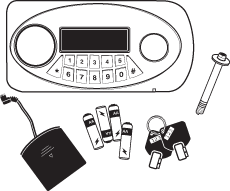
Insert 4AA batteries into the External Power Pack
Plug the External Power Pack into the External Power Jack
Allow the lock to power up: [[ALREADY]] will appear
Enter : [factory set User Code 1: # – x – x – x – x – #] or
[factory set User Code 2: # – x – x – x – x – x – x – #]
You will hear a ‘Click’ to indicate that the safe is unlocked
Turn the handle clockwise within 5 seconds of unlocking to open the door
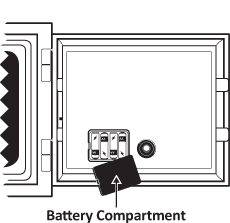
Insert 4AA batteries in the battery compartment [located on inside/back of door]
To lock safe, close door & turn the handle back to the locked position
Note:
Always make sure your safe is locked before walking away!
If you accidently enter a wrong number, press * to delete it
Valid Code : LCD will display [[OPEN]]
Invalid Code : LCD will display [[Error]]
Enter 3 wrong codes & this will trigger the Wrong Code Alarm
To turn the alarm off immediately, you must enter a valid code
Example : x-x-x-x-#
If a valid code is not entered, the alarm will sound for 1 minute after the last wrong code was entered
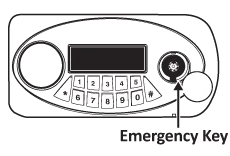
If the batteries die or you lose your code, use the emergency keys
[2 keys are included with your safe]
Insert a pin or similar item into the Access Hole
[Located on the bottom edge of keypad]
Gently push the pin up to release the emergency key cover
The emergency cover will loosen so you can remove it
Insert the emergency key & turn in counter-clockwise
Turn the handle to open door
If the cover does not re-attach easily it may be upside down
Note:
If you happen to misplace your emergency keys or need to order extra keys, contact Mesa Tech Support: 888.381.8514
If the battery level indicator on the display only reveals 1 bar
If you enter your code & the LCD screen displays [[LoBATTE]]
If you enter your code & [[OPEN]] displays but the safe does not open
If the keypad has no sign of life
IMPORTANT:
If the batteries die or are too low to unlock your safe, use your External Power Pack or Emergency Key to open the safe & change your batteries
This lock is equipped with 2 User Codes
User 1 Code is factory set
User 2 Code is factory set
Please see your user manual for the factory set User Codes or
contact Tech Support.
IMPORTANT:
Because the codes are factory set, we highly recommend changing both codes to your own unique codes immediately!
When viewing Open Door Records, [[PASS]] will display for User 1 & [[PASS2]] will display for User 2
Input : #
The display will turn amber & [[——–]] will display
Input : Code-#
You will hear a ‘Click’, the display will turn blue & [[OPEN]] will display
Example : x-x-x-x-#
Valid Code : LCD will display [[OPEN]]
Invalid Code : LCD will display [[Error]]
If the handle/locking bolts are still in the unlocked position, close the door & turn the handle back to the locked position
If the door is open & the handle/locking bolts are in the locked position, follow steps 1-3 under Unlocking the Safe; close the door & turn the handle back to the locked position
The detent prevents the door from being closed with the locking bolts in the locked postion, avoiding any damage to the locking bolts
When you unlock your safe & open the door, the locking bolts are held in the unlocked position by the safe’s detent
To releas the locking bolts, push the detent rod in & turn the handle to the locked position
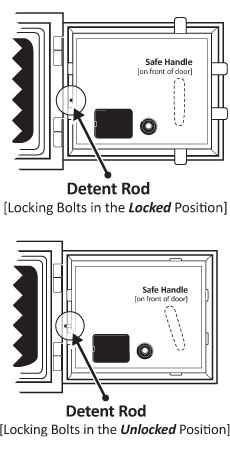
Always perform this operation with the door open!
Input : #
The display will turn amber & [[——–]] will display
Input : -#
You will hear a ‘Click’, the display will turn blue & [[OPEN]] will display
While the display is still blue, Input : *
[[——–]] will display
Input : New Code-# [New Code can be 1-8 digits]
[[INTO]] will displahy
Your new code has now been set
Example : #-1-2-3-4-#-*-#-4-3-2-1-# [Code was 1234, New Code is now 4321]
If your accidently enter a wrong number, press * to delete it
Note:
Test your new code out several times before closing the door & locking the safe
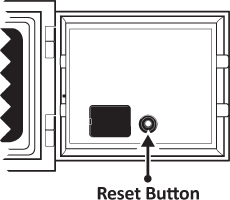
This is used to reset both User Codes back to their factory settings
Locate the red button on the back panel of the safe door
Press the red button. The display will turn amber & [[CLEAR]] will appear
Both User Codes have now been reset to factory settings
Test the codes to make sure they have been reset back to the factory settings before closing the door & locking the safe
If your do not want your code to show on the LCD display, Input : #-*-Code-#
Example : #-*-1-2-3-4-#
The screen will display [[oooo—-]] instead of [[1234—-]]
You will have to do this every time you want your code concealed
You may set a Tamper Alarm that will sound if the safe is hit/attacked
Input : 0, [[BELL ON]] will display. The Tamper Alarm is now set
If the Tamper Alarm is triggered, enter a valid code to turn off the alarm
If wrong codes are being entered, the alarm will turn off 1 minute after the last wrong code is entered
Once the alarm has been triggered or a valid code has been entered to unlock the safe, you will have to reset the Tamper Alarm
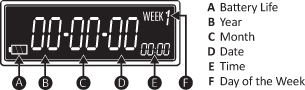
The date format on the display is
year / month / date
The time format is
Military Time
The week is the Day of the Week:
1 represents Monday, 2 Tuesday, etc.
You will have
6 seconds
to make an entry between fields or the operation will be completed
Input : *
The display will turn amber & the Year field will blink
Input : 0 or 8 to change the Year.
Input 0 to descend, 8 to ascend.
Input : #
Display is still amber & the Month feild will blink
Input : 0 or 8 to change the Month.
Input : #
Display is still amber & the Date feild will blink
Input : 0 or 8 to change the Date.
Input : #
Display is still amber & the Hour feild will blink
Input : 0 or 8 to change the Hour.
Input : #
Display is still amber & the Minute feild will blink
Input : 0 or 8 to change the Minute.
Input : #
Display is still amber & the Week feild will blink
Input : 0 or 8 to change the Day of the Week.
This function allows you to view the date & time the safe was accessed & which User accessed the safe
[[ PASS ]] is User 1 , [[PASS2 ]] is User 2
You can view the last 14 valid entries, starting with the most recent entry
Input : #
The display will turn amber & [[——–]] will display
Input : Code-#
You will hear a ‘Click’, the display will turn blue & [[OPEN]] will display
As soon as [[OPEN]] disappears while the display is still blue, enter 0
The display will first show the date then the time the safe was accessed followed by the User [[PASS1]] or [[PASS2]]
To view the next opening record, Input : 0 while [[PASS1]] or [[PASS2]] is displayed
Please contact Tech Support at 888.381.8514 for assistance.
Live Technical Support Available Monday – Friday 8:00am – 4:30pm [Pacific Standard Time]
Click Here to view our Mesa Safe Warranty.
Click Here to view our Limited Lifetime MBF Gun Safe Warranty.
