


MSL-MFS2


MSL-MFS2 Lock
Safes with this Lock:
MFS Series U.L. Classified Fire
These safes have been discontinued.

IMPORTANT
To ensure the safety of your belongings, you MUST change the factory set User Codes to your own unique codes immediately!
Before closing the door, make sure all the changes are correct.
Quick Start
Install 4 AA batteries into the External Power Pack [Batteries not included]
Plug the External Power Pack into the External Power Jack
Enter : [factory set User Code 1: # – x – x – x – #] or
[factory set User Code 2: # – x – x – x – x – x – x – x – x – #]
Turn the handle or thumb-turn clockwise within 5 seconds of unlocking to open the door
Install 4 AA batteries into the battery compartment [located on inside/back of door]
To lock your safe turn the handle or thumb-turn back to the locked position and make sure your safe is locked before walking away
IMPORTANT:
Always make sure your safe is locked before walking away!
Input : #
This will wake up the lock
Input : Code-#
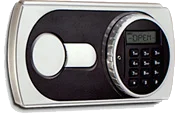
[[OPEN]] will display
Turn the handle or operating key within 5 seconds of unlocking & open the door.
Valid Code : LCD will display [[OPEN]]
Invalid Code : LCD will display [[Error]]
Closing the Door
Close door & turn the handle or thumb-turn back to the locked position
Always check to make sure the safe is locked before walking away.
You can only perform this operation with the door open!
Press the reset button located on the back of the safe door. [Red button]
Input : Your New Code -# [1-8 digits]
Valid Code Change: LCD will display [[In]]
Test your code a couple times before closing the door.
You can only perform this operation with the door open!
Input : #
Input : 0-0
Press the reset button located on the back of the safe door. [Red button]
Input : Your New Code -# [1-8 digits]
Valid Code Change: LCD will display [[In]]
Test your code a couple times before closing the door.
IMPORTANT
To ensure the safety of you belongings, you Must change the factory set Master Code to Your own unique code immediately!
If 3 wrong codes are entered consecutively, the keypad will shut down for a period of 3 minutes & an alarm will sound for 10 seconds. During this lock out period, the keypad will not accept any codes
[[Error]] will display until the lockout period is over.
Input : * before entering your code
This will prevent your code from being displayed on the LCD screen.
Example : *-#-1-2-3-4-# will display as [[* * * *]]
Delete Wrong Entry = Input : * to delete 1 entry, or press & hold * to delete the entire entry
After entering your code [[Lo-batte]] will display
Important: If the batteries die or are too low to unlock your safe, use your External Power Pack or Emergency Key to open the safe & change your batteries.
The battery compartment is located on the back of your safe door.
Replace exsiting batteries with 4 AA batteries
If the batteries die or you lost your code use the emergency key [ 2 keys included ]
Insert the plug located on the External Power Pack into the access hole which is located on the bottom edge of the keypad.
Push the plug up to release the emergency key cover.
The emergency cover will loosen enough so you can remove it.
Insert the Emergency Key & turn it counter-clockwise for models MFS38E & MFS45E or turn it clockwise for models MFS-55E, MFS63E & MFS80E.
Turn the handle or thumb-turn to open the door.
IMPORTANT
To ensure the safety of you belongings, you Must change the factory set Master Code to Your own unique code immediately!
Please contact Tech Support at 888.381.8514 for assistance.
Live Technical Support Available Monday – Friday 8:00am – 4:30pm [Pacific Standard Time]
Click Here to view our Mesa Safe Warranty.
Click Here to view our Limited Lifetime MBF Gun Safe Warranty.