


MSL-101


MSL-101 Lock
Safes with this Lock:
MFL Depository [early models]
These safes no longer come standard with this lock.
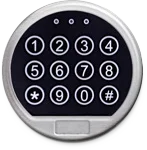

IMPORTANT
To ensure the safety of you belongings, you Must change the factory set Master Code to Your own unique code immediately!
Two Code Capacity
User Code: Factory Set
Master Code: Factory Set
Please see your user manual for the factory set Codes
or contact Tech Support.
Note:
If the safe is opened with the override code it will set the User Code back to the factory default.
WE HIGHLY RECOMMEND THAT YOU CHANGE THE FACTORY SET OVERRIDE CODE.
Wrong Code Penalty
Entry of 3 consecutive invalid codes results in a 1 minute delay period.
Audio/Visual Signals
Double Signal : 2 flashes & 2 beeps – indicates entry is valid or accepted.
Triple Signal : 3 flashes & 3 beeps – indicates invalid or not accepted.
Automatic Re-Locker
The controller will re-lock in 4 seconds after a valid entry is made and the door is open.
Low Battery Alert
Controller repeated beeping during an unlocking indicates that the battery is low & needs immediate replacement.
Manufacturer recommends the use of 9V Alkaline Batteries & an annual maintenance replacement of the batteries.
Single & Dual User Mode
Single Mode : Open lock with 1 code [Override or User Code]
Dual Mode : Open lock with 2 codes [User 1 & User 2 Code]
Time Delay
Time Delay : A time period waiting for opening lock. The maximum Time Delay is 99 minutes
Always Perfrom this operation with the door open
Before closing the door, make sure all the changes are correct.
Change Master Code [3-8 digits]
Enter : #- Existing Master Code -#
The light will stay Orange for 20 seconds
Enter : New Code -#
NOTE: The Master Code & User Code can be set to a 1-12 digits
[[SET]] will display & LED is now Orange for 20 seconds
Re-Enter : New Code -#
[[OPEN]] will display & LED will signal twice confirming the code change is successful
If a mistake is made wait 25 seconds and repeat steps 1 – 6
Note:
Verify the new manager code at least 3 times before closing the door to make sure the code is correct.
Operations between adjacent steps need be completed in 10 seconds. Otherwise, the lock system sets back to standby status.
Enter : *- User Code -#
[[OPEN]] will display & LED will signal twice indicating a valid code.
Turn the handle clockwise while [[OPEN]] is displayed & LED is Green
Enter : *- User Code -#- Master Code -#
[[OPEN]] will display & LED will signal twice indicating valid codes
Turn the handle clockwise while [[OPEN]] is displayed & LED is Green
NOTE: Valid Code – Lock will double signal
Invalid Code – Lock will triple signal
Enter : #- Master Code -#
[[SET]] will display & LED is now Orange for 20 seconds
Enter : *- [01-99] -#- [01-99] -#
[[OPEN]] will display & LED will signal twice confirming that the setting change is sucessful.
Press : * or # to initiate the Time Delay
[[SET]] will display & LED will signal once every 2 seconds indicating that the lock is in the delay period
After the time delay period, a 2 minute window is given to enter code
[[SET]] will display & LED will signal twice every 4 seconds during the 2 minute window
Note:
Verify the new manager code at least 3 times before closing the door to make sure the code is correct.
Operations between adjacent steps need be completed in 10 seconds. Otherwise, the lock system sets back to standby status.
Enter : #- Master Code -#
[[SET]] will display & LED is now Orange for 20 seconds
Enter : *-00-#-00-#
[[OPEN]] will display & LED will signal twice confirming that the code setting is successful
Enter : #- Master Code -#
[[SET]] will display & LED is now Orange for 20 seconds
Enter : *-1-#-1-#
[[OPEN]] will display & LED will signal twice confirming the setting change is successful
Enter : #- Master Code -#
[[SET]] will display & LED is now Orange for 20 seconds
Enter : *-2-#-2-#
[[OPEN]] will display & LED will signal twice confirming the setting change is successful
The LED light turns Red during an opening indicates that the battery is low and needs immediate replacement.
Uses one 9V Alkaline Battery
If batteries are depleted and will not allow lock to open, simply follow the instructions below.
Lock contains a non-volatile memory, even with batteries removed the lock will retain all programming.
Locate the battery cover on the bottom edge of the keypad and remove the cover by pulling on the tab.
Carefully remove the used 9V Battery from the compartment.
CAUTION! Hold onto battery connector to avoid pulling wires out of housing.
Reinsert the new battery, do not force the battery into the compartment.
Please contact Tech Support at 888.381.8514 for assistance.
Live Technical Support Available Monday – Friday 8:00am – 4:30pm [Pacific Standard Time]
Click Here to view our Mesa Safe Warranty.
Click Here to view our Limited Lifetime MBF Gun Safe Warranty.
