


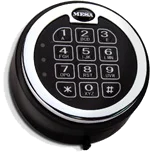
MSL-500 Lock


MSL-500 Lock

IMPORTANT
To ensure the safety of your belongings, you MUST change the factory set Master Code to your own unique code immediately!
Six Code Capacity
Users : Master, User 1, User 2, User 3, User 4 & User 5
Lock is shipped from factory with a factory set Master Code
Please see your user manual for the factory set Master Code or
contact Tech Support.
Wrong Code Penalty
If three incorrect entries are entered in a row, the keypad will shut down for a period of five minutes.
During this shut down period you will not get a response from the keypad.
Audio/Visual Signals
The Lock Has No Response (No Flash, No Beeps)
Important: Make sure the wires in the keypad housing are not pinched and are securely connected.
Low Battery Alert
Controller repeated beeping during an unlocking indicates that the battery is low and needs immediate replacement.
Manufacturer recommends the use of 9-Volt premier alkaline batteries and an annual maintenance replacement of the batteries.
Single & Dual User Mode
Single Mode: Open lock with one (1) code (override or user code).
Dual Mode: Open lock with two (2) codes (User 1 and User 2 code).
Time Delay
Programmable time delay function can be set from 01 minutes to 59 minutes
Time Delay: A time period waiting for opening lock
Always Perform this operation with the door open
Before closing the door, make sure all the changes are correct.
Quick Start
Install a 9-Volt Battery
Enter: [factory set Code x – x – x – x – x – x – x – x – #]
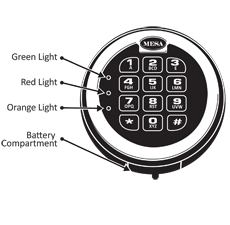
Green light will turn on.
Turn handle before the green light turns off
To lock your safe, close door & turn handle back to the locked position
IMPORTANT:
Always make sure your safe is locked before walking away!.
If your code is correct a green light will turn on for approximately 5 seconds & you will hear a ‘Click’
If the code is in incorrect a red light will turn on, followed by 5 ‘Beeps’
IMPORTANT:
Be sure to press firmly & ONLY use your finger tips to press the keys on the keypad. DO NOT USE your finger nail, a pen, etc. This will damage the keys
The lock has no response [no ‘Beeps’]
Make sure the battery wires in the keypad housing are not pinched & are securely connected
Lock may possibly be in the Lockout Penalty mode. Wait 5 minutes & check if the lock responds [see Wrong Try Penalty]
Replace the existing battery with a new one [see Changing The Battery]
The lock is responding by does not unlock
Make sure you are getting a valid response
Make sure you get a signal with every key-stroke
Make sure you are not in Time Delay mode [see How to Open In Time Delay Mode]
Replace existing battery with a new one [see Changing The Battery]
Master Code is factory set
Please see your user manual for the factory set Master Code or contact Tech Support.
Note:
The Master Code should always be held by the owner of the safe. You will not be able to activate/delete users, set up single/dual entry & set time delay without the Master Code
Single User Mode
[Default Setting]
Input : Code -# [light stays green for 5 seconds]
Turn handle to the unlocked position before the green light disappears
Example : x-x-x-x-x-x-x-x-#
Invalid Code : Red light appears along with 5 ‘Beeps’
Dual User Mode
[Please refer to Setting Single User & Dual User Mode ] Input : 1st Code -# [lock will ‘Beep’ 2 times]
Input : 2nd Code -# [light stays green for 5 seconds]
Turn handle to the unlocked position before the green light disappears
Example : 1st Code -#
Invalid Code : Red light appears along with 5 ‘Beeps’
If 4 wrong codes are entered consecutively, the keypad will shut down for a period of 5 minutes. If your press any key during this penalty period, the orange light will turn on for approximately 2 seconds and your will hear a ‘Beep’
Input : *-* [lock will ‘Beep’ 2 times]
Input : 8-8-8-# [lock will ‘Beep’ 2 times]
Input : Current Master Code -# [lock will ‘Beep’ 2 times]
Input : New Master Code -# [lock will ‘Beep’ 2 times]
Re-Input : New Master Code -# [lock stays green for 3 seconds]
Example : *-*-8-8-8-#- Master Code -#- New Master Code -#- New Master Code -#
Unsuccessful Code Change : 5 ‘Beeps’ [the old code is still valid; repeat steps 1-5]
Note:
Always perform this operation with the door open! Test the new code several times before closing the door.
IMPORTANT
To ensure the safety of your belongings, you MUST change the factory set Master Code to your own unique code immediately!
Input : *-* [Lock will ‘Beep’ 2 times]
Input : 3-3-3-# [Lock will ‘Beep’ 2 times]
Input : Current Master Code-# [Lock will ‘Beep’ 2 times]
Input : [User#] -# [“User#” : Specify which user your would like to activate; 1, 2, 3 or 4]
Input : New User Code -# [Lock will ‘Beep’ 2 times]
Re-Input : New User Code -# [Light stays green for 3 seconds]
Example [activating ‘User 4’] : *-*-3-3-3-#- Master Code -#-4-#- New User Code -#- New User Code -#
Unsuccessful Code Activation : 5 ‘Beeps’ [repeat steps 1-6]
Input : *-* [Lock will ‘Beep’ 2 times]
Input : 4-4-4-# [Lock will ‘Beep’ 2 times]
Input : Current User Code -# [Lock will ‘Beep’ 2 times]
Input : [User#] -# [“User#” : Enter the User# that identifies the Current User Code on Step 3]
Input : New User Code -# [Lock will ‘Beep’ 2 times]
Re-Input : New User Code -# [Light stays green for 3 seconds]
Example [changing ‘User 2’] : *-*-4-4-4-#- User 2 Code -#-2-#- New User Code -#- New User Code -#
Unsuccessful Code Change : 5 ‘Beeps’ [repeat steps 1-6]
Input : *-* [Lock will ‘Beep’ 2 times]
Input : 6-6-6-# [Lock will ‘Beep’ 2 times]
Input : Current Master Code -# [Lock will ‘Beep’ 2 times]
Input : [User#] -# [Lock will ‘Beep’ 2 times]
[“User#” : Specify which User# you would like to delete; 1, 2, 3 or 4]
Re-Input : [User#] -# [Light stays green for 3 seconds]
Example [deleting ‘User 1’] : *-*-6-6-6-#- Master Code -#-1-#-1-#
Unsuccessful Code Deletion : 5 ‘Beeps’ [repeat steps 1-5]
Single User Mode
[Only 1 code needed to open safe]
Input : *-* [Lock will ‘Beep’ 2 times]
Input : 1-5-8-# [Lock will ‘Beep’ 2 times]
Input : Current Master Code -# [Lock will ‘Beep’ 2 times]
Input : 1-# [Light stays green for 2 seconds]
Example : *-*-1-5-8-#- Master Code -#-1-# [this will set Single User Mode]
Unsuccessful Mode Change : 5 ‘Beeps’ [repeat steps 1-4]
Dual User Mode
[2 seperate codes needed to open safe]
Input : *-* [Lock will ‘Beep’ 2 times]
Input : 1-5-8-# [Lock will ‘Beep’ 2 times]
Input : Current Master Code -# [Lock will ‘Beep’ 2 times]
Input : 2-# [Light stays green for 2 seconds]
Example : *-*-1-5-8-#- Master Code -#-2-# [This will set Dual User Mode]
Unsuccessful Mode Change : 5 ‘Beeps’ [repeat steps 1-4]
[To use this mode, see How to Open Your Safe]
Input : *-*-1-5-9-# [Lock will ‘Beep’ 2 times]
Input : Current Master Code -# [Lock will ‘Beep’ 2 times]
Input : 2-# [Light stays green for 3 seconds]
01 = 1 minute Time Delay 00 = Will turn Time Delay mode off 59 = 59 minute Time Delay
Example : *-*-1-5-9-#- Master Code -#-03-# [This will set the Time Delay period to 3 minutes]
Unsuccessful Code Deletion : 5 ‘Beeps’ [repeat steps 1-4]
The Master Code will override the Time Delay
Enter any valid code other than the Master Code
Once the code is entered, the Time Delay will activate
During the Time Delay, codes will not be accepted. When you press any key, the light will remain orange for 3 seconds
The lock will ‘Beep’ continuously & the green light will flash for the last 30 seconds of the Time Delay period
Once the continuous ‘Beeps’ stop, the lock will unlock for 5 seconds
Turn the handle to open safe
When you enter your code, a green light & a red light will turn on for approximately 5 seconds; you will also
hear 10 ‘Beeps’. The safe will probably not unlock when you get this response.
When you enter your code, a green light will turn on for approximately 1 second. The safe will not unlock when you get this response.
If your keypad has no response [no ‘Beeps’; no lights]
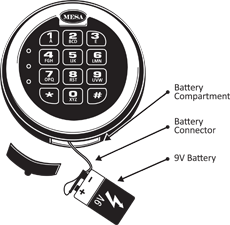
Locate the battery cover on the bottom edge of the keypad & remove the cover by pulling on the tab.
Carefully and gently remove the 9-Volt battery from the compartment.
CAUTION! Hold onto battery connector to avoid pulling wires out of housing.
Carefully re-insert the new 9V alkaline battery, do not force the battery into the compartment.
The lock will retain all current codes & settings.
Please contact Tech Support at 888.381.8514 for assistance.
Live Technical Support Available Monday – Friday 8:00am – 4:30pm [Pacific Standard Time]
Click Here to view our Mesa Safe Warranty.
Click Here to view our Limited Lifetime MBF Gun Safe Warranty.


