




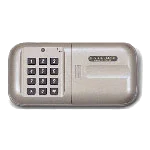
MSL-SS-T23 Lock

Safes with this Lock:

MFS Series U.L. Classified Fire
These safes have been discontinued.

IMPORTANT

To ensure the safety of you belongings, you Must change the factory set Master Code to Your own unique code immediately!

Opening the Door

Press the ” * ” button (Red LED is now on)

Press 1, 2, 3 in sequence (Red LED is still on)

Press the # button (Green LED is now on)

Open the door before the Green LED turns off

Note:

If the wrong code is entered, 3 beeps will sound (LED is Red)

If the wrong code is entered 3 times consecutively, the key pad will go into lockout mode for 3 minutes

First open the door with the set code.

On the back fo the door there is a change hole, inside the change hole is a black button, press the black button once. (Red LED is now on)

While the Red LED is on, enter your new personal code (code can be set to a 1 to 15 digit code)

Press the # button to finish setting your new personal code.

A melody of beeps will confirm the setting of your new personal code.

Note:

Verify the new code at least 3 times before closing the door to make sure the code is correct.

After entering your correct personal code and you hear 3 beeps, it is indicating that your batteries are low.

To gain access to your batteries, slide the cover on the keypad to the right.

Replace with 1.5V “AA” sized alkaline batteries.

Note:

The set code will not be erased after changing the batteries.

Please contact Tech Support at 888.381.8514 for assistance.
Live Technical Support Available Monday – Friday 8:00am – 4:30pm [Pacific Standard Time]
Click Here to view our Mesa Safe Warranty.
Click Here to view our Limited Lifetime MBF Gun Safe Warranty.

Available Downloads